.png&w=3840&q=75)
You're spending 10+ hours a week editing instead of creating.
You are not a video editor. You are a creator whose timeline sits half-finished in Premiere while ideas pile up. A single 10-minute video at your stage takes 8 to 12 hours to edit, the biggest time sink in the workflow. It's the exact point where channels stall or start compounding. In the 2025 Vibely creator survey, 72% of creators who outsource hire a video editor first.
This guide is the complete playbook for how to hire a YouTube video editor in 2026. I've placed hundreds of editors for creators over the last few years through our dedicated YouTube editor placements, and hiring fails in predictable ways. Creators wait too long. They pick the cheapest option. They skip the paid trial. They send vague feedback. They ghost their editor until the editor ghosts back. All of it is avoidable.
Over the next 17 sections, I'll cover when to hire, what editors actually cost in 2026 (with real pricing by model and video type), where to find them, the 11 YouTube-specific skills to vet for, 15 interview questions with "what a good answer sounds like" notes, 9 red flags, a 7-clause contract checklist, a 30-day onboarding plan, and the long-term practices that keep an editor with you for 3 years instead of 3 months.
Most articles give you three hiring options: freelance, full-time, or agency. I'll show you a fourth: placement. It changes the math.
Before we talk about how to hire, let's talk about whether you should. Here are the 5 signals.
Want an editor who actually sticks around?
We place dedicated YouTube video editors from the Philippines and South Africa, matched to your channel. Flat monthly, long-term, no rotating freelancers.
When It's Actually Time to Hire a YouTube Video Editor
Most creators wait 6 months too long to hire.
"Ready" feels subjective. It isn't. You can calculate it in 3 minutes with five numbers. The most useful is opportunity cost. If you earn $200/hour from your business and editing takes 6 hours a week, that's $1,200/week you are paying yourself to do a task you could delegate for $400-$800/month. The math is not close.
If 3 or more of these signals are true, you are already behind.
- Time threshold: 8+ hours editing per video or 40+ hours per month. The industry benchmark (Gling.ai) is 1 to 1.5 hours of editing per finished minute. A 10-minute video should take 10 to 15 hours. If you're past that and still editing alone, editing is now your full-time job. Creating isn't.
- Opportunity cost: your hourly value × weekly editing hours × 4 > $800/month. If that number is bigger than an editor's monthly rate, you are losing money every week you wait. A Philippines full-time editor at $1,200/month pays for itself the first week for most Stage 2 creators.
- Upload cadence: 2 to 3+ videos per month on 10+ minute content. One person cannot sustain that pace at high quality and also film, script, record audio, respond to comments, and run the business. See our complete cost guide for pricing by cadence.
- Revenue threshold: $1,000+/month channel revenue, or $3,000+/month from your broader business. At these numbers, an editor is covered 2 to 3x over. Below them, a per-video freelancer makes more sense than a dedicated hire.
- Burnout signals: you edit at night, miss upload windows, or dread filming because you dread what comes after. 63% of US creators report burnout symptoms in the 2025 Vibely data. If you film 2 videos a weekend and edit zero Monday, the bottleneck is obvious.
If you checked 3 or more boxes, you already know the answer. Next question: what is this person actually going to do for you?
What a YouTube Video Editor Actually Does
Most creators think they are hiring someone to cut clips. They are actually hiring a retention engineer.
The difference changes who you hire, what you pay, and what goes in the job post. A "general video editor" can assemble, color, mix audio, and export a clean MP4. A YouTube editor does all of that plus engineers viewer retention through pacing, pattern interrupts, hook mechanics, chapter placement, and Shorts repurposing. That second layer is where the algorithm lives.
The practical difference:
- General editor does: assembly, rough cut, fine cut, color grade, audio mix, captions, graphics, export. YouTube editor also does: hook construction in the first 30 seconds, pattern interrupts every 5 to 10 seconds in fast-paced sections, retention graph analysis, chapter placement to reduce pogo-sticking.
- General editor uses: Premiere, DaVinci, Final Cut. YouTube editor also uses: Descript, Capcut, Opus Clip, Frame.io, and YouTube Studio analytics.
- General editor optimizes for: a clean final cut. YouTube editor optimizes for: average view duration, CTR collaboration with thumbnails, 30-second drop-off rate.
- General editor delivers: the long-form file. YouTube editor also delivers: 3 to 5 vertical cuts ready for Shorts (see our guide on Shorts editing work).
- General editor thinks: "does this look good?" YouTube editor thinks: "where does this lose the viewer?"
A good YouTube editor watches the retention graph with you, not at you. They can point to the timestamp where viewers dropped and tell you why: music too quiet, cut held 4 seconds too long, no pattern interrupt before minute 8. They also know 33% of viewers drop in the first 30 seconds if the intro is weak, and a pattern interrupt at the 25 to 35 second mark increases average retention by 23% (Retention Rabbit data).
That scope changes who you hire. Where you find them depends on which version of the role you want: full-time, freelance, agency, or placement.
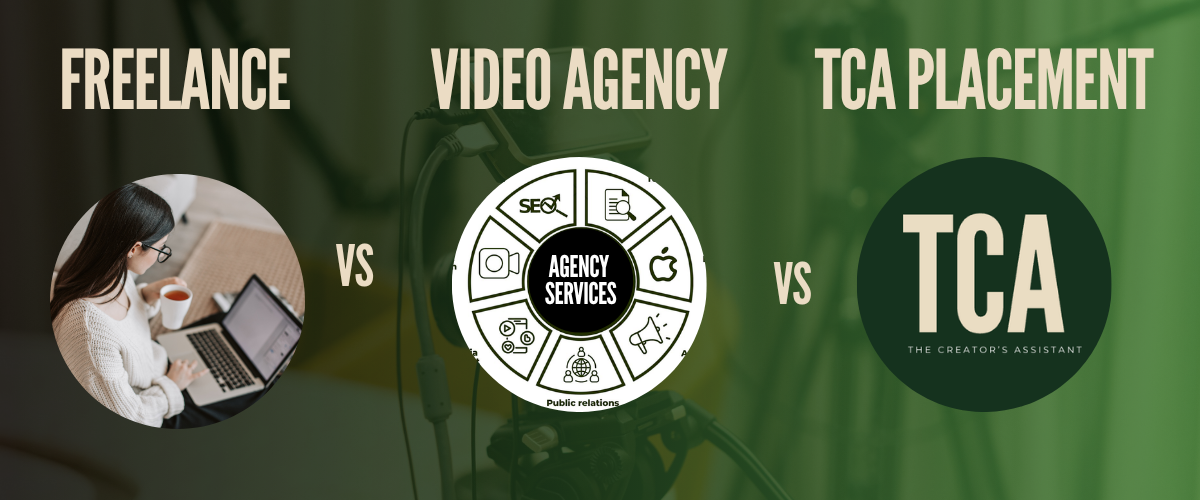
Types of YouTube Editors: Freelance vs Full-Time vs Agency vs Placement
Every article gives you three options. There are four.
Most guides cover freelance, full-time in-house, and agency. They skip talent placement, a separate category with different tradeoffs. Placement is often the right answer for creators between $5K and $50K/month who want dedication without US salary math.
Freelance (per-project). Platforms like Upwork, Fiverr, and direct inbound. Pros: cheap to start, low commitment, easy to test. Cons: ghosting, inconsistent quality, revision hell, and the management tax of running multiple editors across time zones. One creator I studied paid 3 freelancers $175/video across 18 months. Three ghosted mid-project. Total damage: $47,000 with 2 to 3 week re-onboarding cycles every replacement (beCreatives case study).
Full-time in-house. A salaried editor on your payroll. Pros: total dedication, IP control, culture fit. Cons: US full-time runs $40K to $60K/year plus benefits, only justified at 40+ hours/week of consistent editing work. MrBeast pays full-time editors an average of $59,529/year (Glassdoor). LazarBeam is hiring a remote gaming editor at $80K to $120K/year. Caleb Hammer's head editor starts at $50K base plus bonuses, team members reported at $100K+.
Agency and subscription services. Flat monthly pricing, $350 to $2,000/month. Pros: no hiring, no onboarding, no payroll. Cons: rotating editors (no channel memory), queue-based turnaround, and "unlimited" packages that aren't unlimited when quality matters. One creator compared $2,600/month freelance variable cost to $1,999/month flat subscription. Subscription won on cost; quality was mixed. See our freelance editor vs agency breakdown.
Talent placement (TCA model). A vetted, dedicated editor placed with you long-term. Pros: one editor who learns your style, flat all-inclusive pricing ($1,800 to $3,000/month), no agency markup, no rotation, no management tax. Cons: built for 2+ year relationships, not project work. AJ and Big Justice are the clearest public example: 11 Filipino editors at $12K/year each, US equivalent would have been $715K, videos hit 50M+ views (Philip Ruffini, X). That's how our placement works, on a creator-native scale.
Which model fits which creator:
| Model | Typical Cost | Dedication | Consistency | Management Load |
|---|---|---|---|---|
Freelance (per video) | $10-$300/video | Low | Variable | High (revisions, time zones, ghosting risk) |
Full-time in-house (US) | $40K-$120K/yr + benefits | Full | High | Medium (your payroll) |
Agency / Subscription | $350-$2,000/mo flat | Low (rotating) | Medium | Low |
Placement (TCA model) | $1,800-$3,000/mo all-in | Full | High | Low |
Once you know which model fits, the next question is the one every creator asks first. What does this actually cost?
How Much Does a YouTube Video Editor Cost?
A 10-minute YouTube video costs anywhere from $40 to $500 to edit. The spread is bigger than the video itself.
The range is wide because "cost" hides three layers: base rate, hidden costs (revisions, rush fees, management time), and the opportunity cost of a bad hire. The beCreatives case study: expected $2,100/month, actual $2,600/month. The 25% gap came from $3,000/month in revisions, $2,400/month in rush fees, $6,000/month in project management, and $1,500/month in missed-deadline damage. Hidden costs ran the bill 25 to 35% over budget.
Real pricing by hiring model in 2026. For a deeper dive, see our complete cost guide.
| Model | Rate | Notes |
|---|---|---|
US freelance (mid) | $40-$80/hr, $500-$2,500/project | Time-zone aligned, best for one-off complex work |
Offshore freelance (Filipino, mid) | $1,200-$2,000/month full-time | 60-70% savings vs US, see hiring a Filipino YouTube editor |
US full-time in-house | $40K-$60K/yr + benefits | $3,300-$5,000/mo, viable at 40+ hrs/wk editing |
Agency / subscription | $350-$2,000/mo flat | Rotating editors, queue-based, no channel memory |
Placement (TCA) | $1,800-$3,000/mo all-inclusive | Dedicated, vetted, long-term, see our pricing |
High-end anchors matter too. MrBeast in-house editors average $59,529/year. LazarBeam pays $80K to $120K/year. Caleb Hammer's team members make $100K+. Premium YouTube editing is a real career with real salary bands, which is why the best freelancers eventually leave the freelance pool.
Per-video pricing depends on content type more than creator scale. Packapop's 2026 breakdown:
| Video type | Typical per-video rate |
|---|---|
Talking head / vlog (basic) | $10-$40 |
Talking head (retention-focused) | $40-$150 |
Long-form 8-12 min, B-roll heavy | $150-$300+ |
Motion graphics / cinematic | $150-$500+ |
Shorts (basic) | $5-$30 |
Shorts (viral format, animated captions) | $15-$40 |
Podcast full episode + clips | $50-$200 |
MrBeast-style high production | $500-$2,000+ |
What you actually pay for, beyond the rate, is revision avoidance. Cheap editors compound costs through revision cycles. One creator reported repeating herself "up to seven or eight times before videos were satisfactory. By the time the video was finally done, I could have edited it myself two or three times over." A $40/video editor who takes 6 rounds is more expensive than a $150/video editor who ships clean on round 2. The cost is the rate plus the revisions plus the opportunity cost of your time running the revision process.
One more real number: a finance YouTube channel placed a dedicated offshore editor at $1,200/month via Somewhere.com for their full upload cadence. That is the modern benchmark for mid-tier dedicated placement.
Numbers on a page are the easy part. Finding the editor behind those numbers is where most creators get stuck.
Where to Find YouTube Video Editors
There are exactly 7 places worth looking, ranked by fit for long-term dedicated hires.
- OnlineJobs.ph. Best for: dedicated Philippines full-time. Cost: $69/month employer account. Gotcha: no built-in escrow, you pay directly, so contracts matter. This is where the Primal Video method lives and where most Filipino editor case studies originate. Applicants run hot, which is why you need a qualifying question in the post.
- Upwork. Best for: global freelance with payment protection. Cost: 3% to 10% platform fees. Gotcha: mass-applicants. Expect 50+ proposals per post, most templated. A qualifying question filters 70% of them.
- Fiverr. Best for: cheap testing of 2 to 3 editors before committing. Cost: $5 to $500 per gig. Gotcha: quality variance is extreme, and the top tier isn't actually cheap. Useful for validating style before you offer a monthly retainer elsewhere.
- YT Jobs and YT.Careers. Best for: YouTube-specialist editors. Cost: free to browse, varies by post. Gotcha: smaller candidate pool than Upwork, but signal-to-noise is much better because candidates self-select for YouTube.
- LinkedIn. Best for: mid-senior editors, US referrals, full-time roles. Cost: free to post, premium for filters. Gotcha: talent skews US and expensive, but referral quality is unmatched if you have a network.
- Direct outreach via creator credits. Best for: editors whose work you already admire. Cost: zero, but expect premium rates if they say yes. Gotcha: editors of top-tier channels are usually booked. A cold DM works 1 in 20 times, and those 1-in-20s are worth it.
- Talent placement (TCA and similar). Best for: creators who want a vetted dedicated editor without running the 8-step process themselves. Cost: $1,800 to $3,000/month all-inclusive. Gotcha: built for long-term, not project work. See our dedicated YouTube editor placements and the full breakdown at where to find YouTube video editors.
Where you find the editor matters less than what you look for. The skills that separate a YouTube editor from a video editor are specific, and mostly unteachable on the job.
What to Look for in a YouTube Video Editor
Premiere Pro proficiency is table stakes. These 11 things are what actually separate a YouTube editor from someone who edits videos for YouTube.
Software skills are a prerequisite, not a qualification. Every candidate claims Premiere. The list below tells you whether they understand the platform, not just the software.
- Hook mechanics. Can they structure a cold open, value promise, and pattern interrupt in the first 30 seconds? Test: ask them to rewrite the first 30 seconds of one of your past videos.
- Retention editing. Do they know progressive rhythm (frequent cuts minutes 0-3, stable B-roll 3-7, alternating calm and energy after minute 8, per AIR Media)? Can they read a Studio retention graph and name the cut that caused a drop?
- Pattern interrupts. Do they use zooms, text overlays, scene changes, or sound effects at 25 to 35 seconds and then every 2 to 3 minutes? The single biggest retention lever.
- Chapter placement. Can they structure a long video with chapters that reduce pogo-sticking and support watch time? Most generic editors skip this entirely.
- Shorts repurposing. Can they extract 3 to 5 standalone hook moments from a long video and reformat them vertically with vertical-native captions? Not the same as cropping.
- Captions (mobile-optimized). Bold, readable, timed to speech, not default YouTube auto-subtitles. 70%+ of watch time is mobile. Bad captions tank retention on their own.
- Audio mix. Voice clear, background hum removed, music 5 to 25 dB below voice, ducked under dialogue. 60-80 BPM for teaching, 100-120 BPM for builds. Bad audio makes a great edit unwatchable.
- Pacing by audience. Younger audiences (13-24) need a visual change every 15 to 25 seconds. Older audiences (25+) hold shots 20 to 40 seconds. The editor should ask who your audience is before starting.
- Thumbnail instinct. Do they flag moments during editing that would make strong thumbnail shots? Editors who ignore thumbnails miss the biggest CTR lever.
- Export settings. H.264 MP4, 1080p or 4K, correct bitrate (35-45 Mbps for 1080p60, 53-68 Mbps for 4K). Not complicated, but a dealbreaker if they don't know.
- Niche awareness. Gaming editors need beat-matched pacing and meme inserts. Educators need callouts and clear on-screen text. Fitness needs rep counters. Ask for 3 portfolio pieces in your specific niche.
Knowing what to look for is half the battle. The other half is the actual process. Here's how to run it.
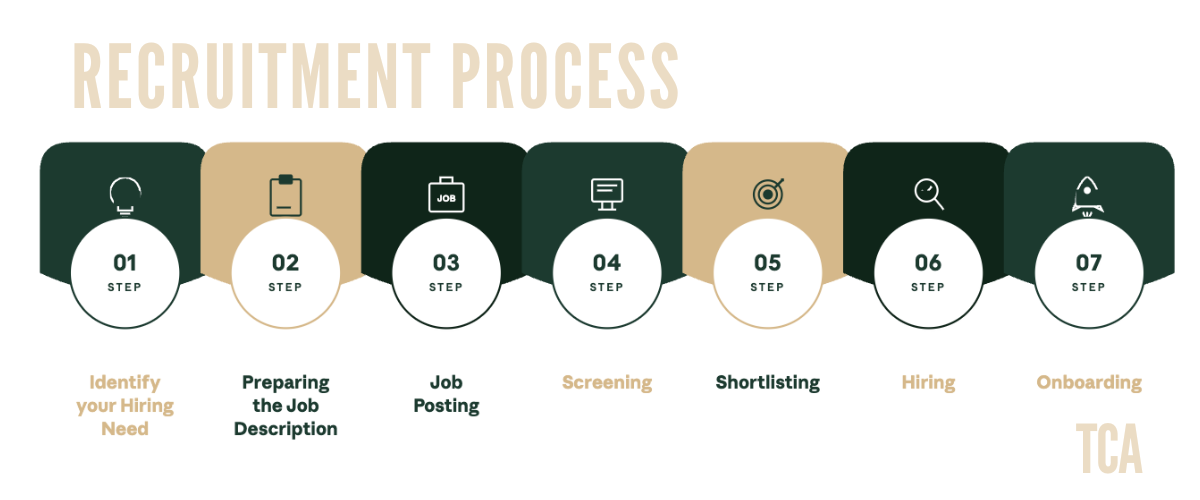
Step-by-Step Hiring Process
You can start today. The full process takes 2 to 3 weeks end-to-end. Here are the 8 steps.
- Define exact needs. Write down video type, monthly upload volume, average length, complexity (talking head vs B-roll heavy), required tools, and budget ceiling. 30 minutes of thinking that prevents 3 weeks of hiring the wrong person. If you upload 4 talking-head videos a month at 10 minutes, you need a mid-level editor at $1,200 to $2,000/month, not a motion graphics specialist at $3,500.
- Write the job post with a qualifying question. Include content type, upload frequency, video length, required tools, revision policy, and one qualifying question like "What's the biggest retention mistake in the first 60 seconds of a YouTube video?" That question filters roughly 70% of mass-applicants who didn't read the post (Alex Berman). Template 1 of 5 (the JD template) handles the structure. See our full job description guide.
- Post on your chosen platform(s). Post simultaneously on OnlineJobs.ph and Upwork for dedicated Filipino hires, or YT Jobs + LinkedIn for US full-time. Expect 30 to 80 applicants in the first 48 hours.
- Screen applications: remove non-readers first. Delete any application that didn't answer the qualifying question. That removes 60 to 70% immediately. Shortlist 5 to 10 based on portfolio relevance and response quality.
- Paid test edit for top 2 to 3. Give them identical raw footage, a clear brief, a 48 to 72 hour deadline, and pay $25 to $50 minimum. Template 2 of 5 (the trial edit scorecard) scores submissions across 8 criteria: turnaround, question quality, pacing, audio mix, caption quality, creativity, revision handling, communication. Top Agents Academy runs trial edits at $25/minute of finished video.
- Structured interview with scorecard. Use the 15 questions in the next section. Template 3 of 5 (the interview scorecard) scores each answer. See our interview questions guide for the deeper dive.
- Contract and offer. Sign a work-for-hire contract before the first paid project (see section 11 for the 7 clauses). Template 4 of 5 (the creative brief) is what you'll send with every project going forward. Include payment terms, revision limits, turnaround commitment, and a 30-day trial period.
- Onboarding kickoff. Day 1 starts Monday. Template 5 of 5 (the 30-day onboarding checklist) runs the first month. Full breakdown in section 12 and our how to onboard a YouTube video editor guide.
If that process feels like too much to run while you're creating, that's the point where placement becomes the right answer. At TCA we run steps 1 through 7 for you and hand you a vetted editor ready for step 8. You can book a free call to see if it fits.
Step 6 gets the most nervous. What do you actually ask? These 15 questions, with what a good answer sounds like for each.
15 Interview Questions to Ask a YouTube Video Editor
Question 1 filters out half of candidates by itself. Question 9 reveals whether they'll actually ship on time.
The questions split across five categories: taste and platform awareness, process and reliability, YouTube-specific technical knowledge, collaboration, and analytics literacy.
- "What YouTube channels have the best editing right now, and why?" Good answer: names 2 to 3 specific channels and articulates editing technique (pacing, hook structure, music choice), not just "I like it." Red flag: generic answers, or only naming MrBeast without specifics.
- "How do you think about the first 30 seconds of a YouTube video?" Good answer: mentions cold open, value promise within 15 seconds, pattern interrupt at 25 to 35 seconds, and knows the 33% first-30-second drop-off stat.
- "Walk me through your workflow from raw footage to final export." Good answer: rough cut, fine cut, color, audio mix, captions, graphics, export. Names specific tools at each stage.
- "How do you use retention data to improve your edits?" Good answer: checks Studio for drop-off timestamps, adjusts pacing at problem points in future videos. Red flag: "I don't usually look at analytics."
- "What's the difference between editing a talking-head video and a B-roll-heavy video?" Good answer: talking head needs pacing and pattern interrupts to keep energy; B-roll needs motion, music sync, and visual storytelling.
- "How do you repurpose a long-form video into Shorts?" Good answer: identifies 3 to 5 standalone hook moments, reformats aspect ratio, adds vertical-native captions, rewrites the first second for Shorts viewers who have zero context.
- "What editing software and AI tools do you use?" Good answer: names primary NLE (Premiere, DaVinci, Final Cut) plus at least one AI tool (Descript for cleanup, Opus Clip for Shorts, CapCut for short-form templates).
- "How do you handle disagreement with the client's creative direction?" Good answer: raises the concern once with reasoning, then executes the client's vision. Red flag: "I just do whatever they want" (no opinion is also a red flag).
- "What happens if you miss a deadline?" Good answer: "I notify you 24 to 48 hours before the deadline, not the morning of." Red flag: vague "it doesn't happen."
- "What does a pattern interrupt mean to you, and when do you use them?" Good answer: unexpected visual or audio change that resets viewer attention. Placed at 25 to 35 seconds initially, then every 2 to 3 minutes.
- "How do you handle vague feedback like 'make it feel more energetic'?" Good answer: asks clarifying questions, requests a reference video, does not guess. Red flag: "I just try different things until they like it."
- "How many clients are you currently editing for?" Good answer: 1 to 3 for full-time, up to 5 for per-video freelance. Red flag: 8+ clients.
- "What's your turnaround for a 10-minute video of standard complexity?" Good answer: 2 to 4 business days for mid-level, 3 to 5 for senior with higher complexity. Red flag: "24 hours" (either lying or using AI to mask weak fundamentals).
- "Show me an edit where you can point to a specific decision that improved retention." Good answer: specific timestamp, specific edit, specific retention outcome. Red flag: cannot attribute any choice to any outcome.
- "What's your computer setup and internet speed?" Good answer: modern GPU (RTX 3060+ or M-series Mac), 32GB+ RAM, 100+ Mbps upload. Prereq for remote offshore editors.
Good interview questions expose good editors fast. The next filter catches the ones who pass the interview but shouldn't. Here are the red flags that should end the conversation immediately.
Red Flags When Hiring a YouTube Video Editor
I've seen every version of this go wrong. Here are the 9 signals I wish every creator knew before they sent the first payment. See the full breakdown at 9 red flags when hiring a YouTube editor.
- Rate suspiciously below market. A "professional YouTube editor" offering $5/video or $200/month full-time. Predicts: stolen portfolio work, AI-generated edits passed off as manual, or chronic underdelivery. Real rates have geographic logic; unexplained cheapness doesn't.
- No questions about your channel before accepting the test. "Sure, send the footage, I'll edit it." I've placed hundreds of editors. When someone asks zero questions before starting, they ghost within 60 days. Every time.
- Slow initial response time (48+ hours). You message Monday, they reply Thursday with no explanation. That's their baseline communication speed. It gets worse on deadline.
- Inconsistent portfolio styles with no through-line. Wedding video, tech review, TikTok dance, real estate walkthrough, all in different styles. Predicts: they edit by template, not taste. They won't learn your style.
- Defensive reaction to paid-test feedback. When you share timestamped notes and they argue each one. Every future revision will feel like a fight.
- Turnaround too fast (10-minute edit delivered in 4 hours). Raw footage Tuesday morning, finished edit Tuesday afternoon. Predicts: AI-generated rough cut passed off as real work, or skipped steps (audio, captions, color). Fast is not a feature if fast is fake.
- Cannot articulate their revision policy. "Oh, I'll just revise it until you're happy." Predicts: endless revisions that eat your budget and their motivation. A real policy specifies rounds, scope, and turnaround.
- Misses deadlines without advance notice. Friday deadline passes, no message, you ping Monday, they apologize. Every upload window will slip. Your schedule becomes theirs.
- Resistance to learning new tools or feedback systems. "Can you just email me changes instead of using Frame.io?" Predicts: they'll resist every process improvement you ever try.
Red flags protect you before you hire. A contract protects you after.
Contracts and Legal Essentials
Without a work-for-hire clause, your editor legally owns the copyright to your video. Not you.
Under US copyright law and most international frameworks, the person who creates a work owns the copyright by default unless the contract explicitly transfers it. "But I paid them" does not matter. The contract language does. Here are the 7 clauses every editor agreement needs. This is general guidance, not legal advice. Consult a contracts attorney for your jurisdiction.
- Work-for-hire clause. States that all deliverables (final video, project files, raw cuts, graphics) become the creator's exclusive property immediately upon payment. Without it, the editor owns the copyright. With it, you do.
- Raw footage ownership. You retain ownership of all source footage, and the editor cannot reuse, share, or publish it without written permission. Protects your unreleased videos from ending up as someone else's portfolio piece.
- NDA clause. The editor cannot share scripts, channel strategy, sponsor information, or unpublished videos. Obligations continue after the relationship ends. Critical if you discuss revenue, sponsors, or unreleased content.
- Revision policy. Specifies number of free rounds (2 is standard), what counts as a revision vs. a new deliverable, and how requests must be submitted (timestamped comments preferred). Prevents the "7 rounds" spiral.
- Termination provisions. Creator can terminate with written notice (email acceptable) without cancellation fee. Define the cure period for quality breaches, typically 7 to 14 days.
- Payment terms. Specifies currency (USD standard for offshore), method (Wise, PayPal, Deel), timing (net-7 after delivery is common), and late-payment consequences. Clear payment terms prevent the single biggest source of editor churn.
- Jurisdiction clause. Specifies which country's laws govern the contract. For offshore editors, name your home jurisdiction. If the editor is in the Philippines and you're in the US, the contract should say it's governed by the laws of your US state.
Contract signed. Offer accepted. Day 1 begins Monday. The first 30 days determine whether this works long-term.

How to Onboard Your New YouTube Video Editor
Expect your editor to hit 70 to 80% of your style on project 1. By project 10, they should hit 95%+. Here's the 30-day plan. See our deeper walkthrough at how to onboard a YouTube video editor.
The biggest onboarding mistake creators make is not giving enough direction. Per Alex Berman, "editors are not mind-readers. Vague feedback like 'make it feel more energetic' wastes time." Specificity is kindness.
Week 1: Foundation.
- Share your brand style guide: pacing preferences, color grade (or LUT), fonts, lower-thirds, intro/outro format, music (genre, BPM, volume rules), B-roll guidelines, subtitle formatting.
- Provide 3 to 5 reference videos with timestamp notes explaining what works and why ("see 2:47 for how I like cuts during story beats").
- Set up a shared folder (Google Drive or Dropbox) with raw footage, LUTs, music licenses, templates, and 2 to 3 finished past videos.
- Assign a simpler-than-normal first edit so you can focus feedback on process, not complexity.
Week 2: Feedback calibration.
- Review the Week 1 edit using Frame.io for timestamped comments. Focus on 2 to 3 specific improvements, not everything at once.
- Record a 20-minute Loom walkthrough of your feedback. Voice and face beat text for nuance.
- Assign the second edit at normal complexity. Expect visible improvement by project 2.
Week 3-4: Workflow integration.
- Set up a PM system (Monday.com or Notion) with milestone deadlines (rough cut by X, graphics by Y, final by Z) instead of a single final deadline.
- Begin sharing YouTube Analytics retention data from past videos. Show them where viewers dropped and ask what they'd change. Makes them invested in outcomes.
- Start escalating autonomy. Give them more latitude on B-roll, music, and pacing choices.
Month 2+: Calibration review and cadence.
- 30-minute alignment call. What's working, what's still misaligned, upload schedule, style guide updates.
- Update the style guide based on weeks 3-4 learnings.
- Establish weekly 15-minute check-ins. Short, frequent, same day of the week.
Don't fire at project 3 for hitting 70 to 80%. That's the normal curve. Fire at project 5 if they're still at 70%. By project 10, they should be at 95%+.
Onboarding gets them working. Long-term management keeps them working for you for 3 years instead of 3 months.
Managing Your Editor Long-Term
I've placed hundreds of editors. The creators who keep the same editor for 3+ years all do the same 6 things. The ones who churn do none of them.
- Pay early, never late. Editors talk to each other. Creators who pay on time (or a day early) get prioritized when their editor has multiple clients. Set autopay. The $0 cost of paying Day 30 vs Day 35 is worth more than any bonus you'll pay.
- Proactively raise rates when your channel grows. A 10 to 15% raise when you hit a milestone (100K subs, first $10K/month, new sponsor) costs little and signals their work is valued. Editors who see the creator grow without being included quietly start looking for the next client.
- Share monthly analytics and attribute specific edits to outcomes. Send a monthly recap of which videos performed best. Name the edit that drove it: "the pattern interrupt at 2:30 held retention, thank you for pushing me on that." The single biggest lever for turning an editor into a partner.
- Ask for creative input. Once a quarter, ask "what would you try differently?" or "what do our weakest videos have in common?" Editors with good taste have ideas. Half their suggestions will be better than yours.
- Document a backup plan. Write a style guide thorough enough that a replacement could onboard from it in a week. Paradoxically, it signals you value systematization, not dependency. They feel more professional, not less secure.
- Escalating autonomy over months 3 to 6. By month 6+, a great editor should work from a raw video and a rough brief without timestamp-level instructions. Reducing brief detail is the clearest signal that you trust their taste. That trust is what keeps them.
Long-term relationships compound. But the skills themselves are shifting fast, and 2026 looks different from 2024. AI is rewriting what a baseline editor can do.
AI Tools Changing YouTube Editing in 2026
AI video tools cut industry-wide production costs by 91% in two years, from $4,500/minute traditional to roughly $400/minute. Monthly active users across AI video platforms exceeded 124 million in January 2026 (Dupple data). They did not replace editors. They raised the baseline.
The 2026 reality: a solo editor with a Descript + Opus Clip stack produces rough cuts in 1 to 2 hours for talking-head content vs. 5 to 10 hours traditional. When you hire an editor, you're no longer paying for 10 hours of assembly. You're paying for 1 to 2 hours of AI-assisted assembly plus the taste and retention decisions AI cannot replicate. If your editor isn't using AI, they're quietly more expensive than the market. Here's the tool matrix to know by name before interviewing. See the full breakdown at AI tools for YouTube video editing.
| Tool | What it does | Best use |
|---|---|---|
CapCut | Freemium editor with AI captions, reframe, background removal | Shorts, short-form templates, fast caption styling ($0-$15/mo) |
Opus Clip | Long-to-short AI repurposing with virality scoring | Extracting 3-5 Shorts from every long-form video ($29-$49/mo) |
Descript | Transcript-based editing, filler-word removal, Studio Sound | Talking-head cleanup, podcast editing, AI audio fixes ($24-$44/mo) |
Adobe Podcast (Enhance) | Free AI audio enhancement | Rescuing bad audio from non-studio recordings (free) |
Topaz Video AI | 4K upscaling, frame interpolation, noise reduction | Post-processing older or lower-res footage ($299+ one-time) |
Runway | Gen-4.5 text-to-video, image animation, inpainting | Concept visualization, B-roll generation, impossible shots ($12+/mo) |
Good editors integrate AI. Weak ones use it to mask weak fundamentals (AI-generated cuts with no narrative sense are a classic tell). Ask which tools they use and for which tasks. The answer separates 2026 editors from 2022 ones.
That covers every major decision. Here are the questions I get most often from creators who have just finished reading a guide like this one.
Frequently Asked Questions
When should I hire a YouTube video editor?
Hire when at least 3 of these 5 signals are true: editing takes 8+ hours per video, opportunity cost exceeds $800/month (hourly value × weekly editing hours × 4), you publish 2 to 3+ times per month, you earn $1,000+/month from your channel or $3,000+/month from your business, and editing is causing burnout or delaying filming.
How much does a YouTube video editor cost?
Per-video freelance ranges $10 to $40 for basic talking head, $40 to $150 for retention-focused, $150 to $300+ for complex long-form. Shorts run $5 to $40. Filipino full-time dedicated is $800 to $3,500/month. US freelance is $20 to $150/hour. US full-time is $40K to $60K/year. Subscription services are $350 to $2,000/month flat. Placement services like TCA are $1,800 to $3,000/month all-inclusive. See our complete cost guide.
Where do I find YouTube video editors to hire?
OnlineJobs.ph for dedicated Philippines full-time. Upwork for global freelance. Fiverr for cheap testing. YT Jobs and YT.Careers for specialists. LinkedIn for mid-senior referrals. Direct outreach via creator credits. And placement services like The Creator's Assistant for vetted dedicated editors. Full ranked breakdown at where to find YouTube video editors.
Should I hire a freelance or dedicated editor?
Freelance for variable volume, one-off projects, or testing before committing. Dedicated (offshore full-time) for 2+ uploads per month, channels with a defined style, and creators who want an editor invested in their growth. The fourth option most guides skip: talent placement, a vetted dedicated editor placed for you with lower risk than DIY. See our dedicated YouTube editor placements.
What should I look for in a YouTube video editor's portfolio?
YouTube-specific examples (not wedding videos or commercials), hook quality in the first 30 seconds, caption style and readability, audio mix clarity, pacing consistency with your style, pattern interrupts and visual variety, and work in your specific niche. Red flag: all different niches with no through-line, or generic corporate work.
What are the red flags when hiring a YouTube video editor?
The 9 most common: rate suspiciously below market, no questions about your channel before starting, slow initial response, inconsistent portfolio styles, defensive reaction to paid-test feedback, turnaround too fast (AI-generated tell), cannot articulate revision policy, misses deadlines without advance notice, and resistance to new tools or feedback systems. Full breakdown in section 10.
How do I onboard a YouTube video editor effectively?
Week 1: share style guide, 3 to 5 reference videos with timestamped notes, shared folder, simpler first edit. Week 2: timestamped feedback via Frame.io, 20-minute Loom walkthrough, second edit at normal complexity. Week 3-4: PM system with milestone deadlines, share YouTube Analytics retention data, escalate autonomy. Month 2+: 30-minute alignment call, update style guide, weekly check-in cadence. Expect 70 to 80% on project 1, 95%+ by project 10.
Do I need a contract when hiring an offshore video editor?
Yes. The contract must include a work-for-hire clause (without it, the editor legally owns the copyright), raw footage ownership, NDA, revision policy, termination provisions, payment terms and currency, and a jurisdiction clause specifying your home country's laws. This is general guidance, not legal advice. Consult a contracts attorney.
How do AI tools change the YouTube editor hiring process?
AI tools (Descript, Opus Clip, CapCut) handle filler word removal, rough cut assembly, and Shorts extraction, making good editors 50 to 70% faster on talking-head and podcast content. They do not replace editors. They raise the baseline. When interviewing, ask what AI tools they use and for what tasks. Good editors integrate AI for speed. Weak ones use it to mask weak narrative and retention instincts.
How do I keep a great YouTube editor long-term?
Pay early, never late. Proactively raise rates when your channel grows. Share monthly analytics and attribute specific edits to outcomes. Ask for creative input quarterly. Document a backup plan. Grant escalating autonomy over months 3 to 6. These 6 practices separate 3-year relationships from 6-month churn. TCA's video editor placement service is built around the same retention principles.
Final Thoughts
Hiring your first editor is the highest-leverage hire you'll make. It's also the one most creators get wrong on the first try.
I've watched hundreds of creators run this process. The ones who get it right share 3 things. They pay on time. They give specific, timestamped feedback. They share their analytics. The ones who churn do none of those. Hiring is not a transaction. It's a 2 to 3 year relationship, and every practice in this guide is built on that premise.
If running all 17 steps yourself feels like the thing you're hiring to avoid, that's when placement makes sense. We place dedicated YouTube editors from the Philippines and South Africa for creators and founders at $1,800 to $3,000/month all-inclusive. No agency markup on hours. No rotating editors. The vetting, trial edit, contract, and onboarding are handled for you. You get a dedicated editor who learns your style and stays for years, not projects. See our dedicated YouTube editor placements.
If that fits, book a free call and we'll see if we can help. If it doesn't, the templates above still run the process. Either way, the goal is the same: you film, they edit, you grow.
Go hire the editor.

_HERO.png&w=3840&q=75)
_HERO.png&w=3840&q=75)